


Pregnancy App & Baby Tracker
4.993.85K Reviews
App Specs
- Version
- 6.17.0
- Updated On
- License
- Free
- Downloads
- 10,000,000+
- Developer
- BabyCenter
- Categories
- Parenting
- Platform
- Android
Screenshots

 Analysis by AppCompare
When pregnancy questions come up at an inconvenient moment, I want an app to make useful guidance easy to reach, not turn a quick check into a chore. That is the appeal of Pregnancy App & Baby Tracker: it brings pregnancy-focused information and tracking tools together in one place. The experience is most useful when you treat it as a companion for keeping organised, rather than a substitute for your care team or a source of urgent medical advice.
When a connection shapes the experience
Pregnancy apps often combine reference material, community discussions and personal tracking, and those different jobs can depend on connectivity in different ways. In practice, I’d make a habit of opening the app when I have a reliable connection if I plan to read articles, browse discussions or look for current guidance. That small routine helps avoid relying on a page loading at the exact moment I’m distracted or in a hurry.
It also changes how I’d use the app for a question I want to bring to an appointment. I’d look up the topic ahead of time, note what I want to ask, and then discuss it with a clinician rather than treating an article or a community reply as a diagnosis. That approach keeps the app useful without asking it to do a job it cannot replace.
The app is free, which makes it approachable for someone who wants pregnancy information and tools without starting with a paid service. BabyCenter is the developer, and its Parenting app has a 4.9 average from around 1.5 million ratings, with more than 10 million installs. Those figures suggest it has reached a large audience, but I’d still judge its fit by whether its content and tools suit my own preferences and care routine.
Using it around a real day
Consider a busy morning: an appointment is coming up, a new question has appeared, and there’s only a few minutes before heading out. I’d use that short window to check the week-by-week material, make a note of the question, and save any tracking task for a calmer moment. The benefit is not that the app removes uncertainty; it gives me a more orderly way to collect what I want to understand and discuss.
For a partner or family member who wants to stay involved, the app can also give them a shared point of reference for the pregnancy timeline. I would still be selective about what I pass along: a concise article or a practical question can be helpful, while forwarding every alert or discussion thread may create more noise than support. The pregnant person should remain in control of what feels relevant.
BabyCenter is a particularly natural fit for someone who likes a guided, week-by-week rhythm and wants educational material alongside pregnancy tracking. If you already prefer a very simple calendar or a notebook, a broader all-purpose health app, or advice directly from your clinician, adding another stream of reminders and content may not improve your routine. The best choice is the one you’ll actually use without feeling watched by a checklist.
Worth Reading Before You Choose

Flipboard Shows What News Apps Must Do Beyond the Feed

Switching to Android Auto Means Rethinking Your Driving Routine

Google Calendar Makes a Crowded Week Easier to Manage

Ludo King Makes the Most of the Minutes Between Plans

Baby Panda World Brings Quick Play to Modern Phones, but Its Game Library Feels Busy

ESPN’s Live Game View Makes Following Close Games Easier
Privacy-minded habits and sensible limits
Pregnancy notes can feel personal, so I’d be deliberate about what I enter and what I share in any community space. A useful habit is to keep identifying details out of public posts and to phrase a question around the health concern rather than personal information. I’d also review the app’s current privacy choices before adding sensitive details; that is good practice for any app holding personal health context.
Community support can make an unfamiliar experience feel less isolating, but people’s pregnancies differ, and a confident-sounding reply is not automatically right for your situation. I’d use other parents’ stories for perspective and companionship, then bring medical concerns to a qualified professional. If online discussions increase anxiety or encourage comparisons, it is reasonable to avoid that part and stick to the tools and reading that feel helpful.
Who will get the most from it
This is a good match for expectant parents who enjoy reading in small bursts, want a pregnancy-specific reference point and appreciate having tracking tools nearby. It may be less suitable for someone who wants a clinical record system, expects every answer to be personalised medical advice, or finds frequent prompts stressful. It is also worth thinking about how much content you want: a comprehensive companion can be reassuring, but more material is not always better when you are already overwhelmed.
If a page or discussion doesn’t load when you need it, I’d avoid repeatedly tapping through in frustration. Try again when the connection is steadier, and keep urgent questions on the appropriate medical channel instead of waiting for an app to respond. For anything important to an appointment, a brief note kept somewhere you can readily access is a practical backup to relying on a live connection at the last minute.
Keeping Track of Your Journey
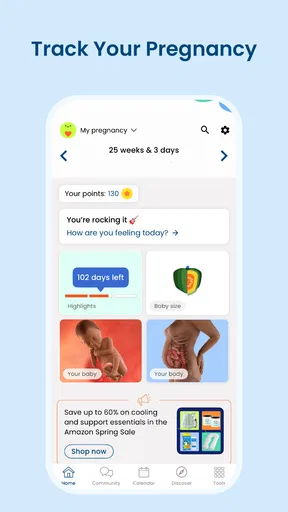
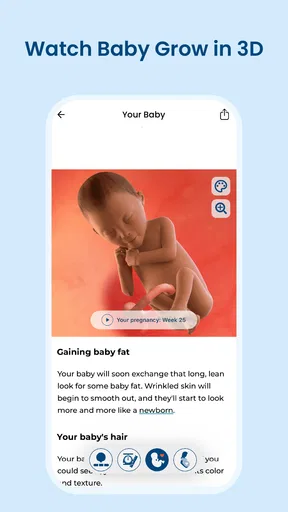
The first thing that caught my attention was the app's ability to track everything from your baby’s development to your own health milestones. You’ll find a detailed week-by-week guide that’s perfect for staying informed about what’s happening inside. It’s like having a pregnancy encyclopedia, but way more fun and interactive.
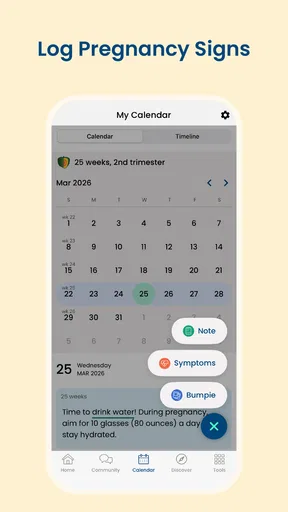
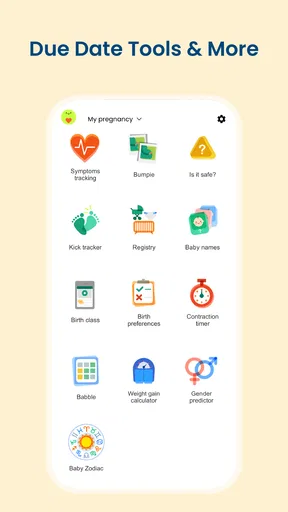
Plus, the app comes with a kick counter and contraction timer, which are super handy as you get closer to the due date. No more guessing games about what’s normal and what’s not. You can easily log your baby’s movements and have detailed records at your fingertips.
Health and Wellness Features
One thing that really stands out is the focus on health. The app offers personalized tips on nutrition and exercise, keeping you and your baby healthy along the way. There’s even a section dedicated to mental health, which is a huge plus. After all, pregnancy isn’t just a physical journey.
I also loved the integration with other health apps. Syncing your fitness and health data makes it easy to have a complete picture of your well-being. It’s like your own pregnancy wellness hub!
Community and Support
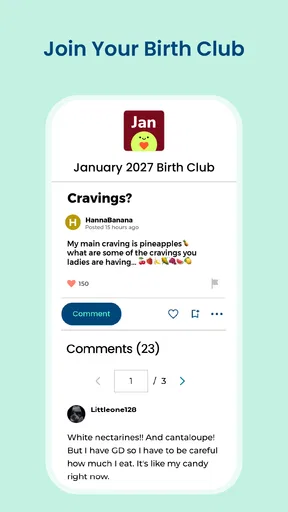
Feeling a little overwhelmed? The app has a vibrant community forum where you can connect with other expecting parents. Whether you’re swapping stories, seeking advice, or just looking for a place to vent, the community is a fantastic resource.
And let’s not forget about the expert articles and Q&A sessions. It’s like having an expert on speed dial, ready to answer all those burning questions that pop up at 3 AM.
Easy Navigation and Design
The design is sleek and intuitive, ensuring you spend less time figuring out how to use the app and more time enjoying it. Everything is neatly categorized, which makes navigation a breeze. From tracking tools to educational content, finding what you need is quick and easy.
The Pregnancy App & Baby Tracker also sends helpful reminders and alerts, so you’ll never miss a prenatal appointment or milestone. It’s like having a personal assistant who knows exactly what you need, exactly when you need it.
In a nutshell, this app seems like a fantastic companion for anyone on the pregnancy journey. With its comprehensive tracking, health tips, and supportive community, it’s definitely worth checking out. So, go ahead and download it to make your pregnancy a little less stressful and a lot more enjoyable!
Version and day-to-day fit
The current version is 5.44.0, and the app is listed for devices running Android 8.0 or later. It carries a Teen content rating, a detail worth considering if a younger family member might browse alongside you. Since the app is free, trying its approach does not require an upfront purchase, though I’d still pay attention to whether its notifications and content suit the way I want to manage pregnancy information.
One practical trade-off is that a week-by-week guide can make the timeline easier to follow, but it can also tempt you to compare your experience too closely with a general description. I’d use those pages as orientation: they can help me name a topic or prepare a question, not set a personal standard for what must happen on a particular day. The same restraint applies to movement tracking and contraction timing; a log can help organise observations, but a concerning change should be discussed with a clinician.
A useful companion, not the whole care plan
Compared with a basic pregnancy calendar, BabyCenter aims to put more than dates in reach: it pairs developmental reading with tracking, wellness content and a community. Compared with a clinician’s guidance, it is much less personal and cannot account for an individual medical history. I find that distinction important. A calendar may be enough for someone who wants only a simple timeline, while this app is more appealing when reading and community are part of the routine too.
It is also not necessary to use every part. Someone who wants privacy above all else may prefer a paper journal for sensitive notes and use the app only for general reading. Someone who dislikes discussion forums can skip them, and someone who finds frequent alerts distracting can decide whether reminders are worth keeping in their daily routine. I’d start with the sections that answer a real need and leave the rest alone, rather than turning pregnancy into a series of app tasks.
Connectivity in perspective
My overall view is that the app makes the most sense when I have a connection available for browsing its information and participating in its community, while keeping important medical decisions grounded in professional care. A steady connection makes the reading-and-discussion side more convenient; a poor one can interrupt precisely the quick lookup that feels useful. That is why I’d use it for preparation and ongoing context, not as my sole source in a time-sensitive situation.
BabyCenter has been available since March 11, 2011, and its established audience is reflected in its 94,000 reviews. I still wouldn’t choose it solely because it is popular. I’d choose it if the mix of weekly guidance, pregnancy tracking and peer support feels calming rather than crowded. For that person, it can be a handy companion through changing questions and routines; for someone who wants a minimal tracker or direct clinical support only, a simpler alternative will likely feel more comfortable.
Pros
- Comprehensive pregnancy tracking features.
- Daily tips for each stage of pregnancy.
- Customizable reminders for appointments.
- User-friendly interface and design.
- Access to a supportive online community.
Cons
- Limited features in free version.
- Some features require internet connection.
- Ads can be intrusive at times.
- Language options are limited.
- Occasional syncing issues with devices.
FAQs for Pregnancy App & Baby Tracker
What features does the Pregnancy App & Baby Tracker offer?
The Pregnancy App & Baby Tracker provides a comprehensive suite of features including weekly pregnancy updates, baby size comparisons, and daily tips. It also offers a contraction timer, weight tracking, and a kick counter, ensuring you have all the tools needed to monitor your pregnancy journey effectively.
Is the Pregnancy App & Baby Tracker available on both Android and iOS?
Yes, the Pregnancy App & Baby Tracker is available for download on both Android and iOS platforms. You can easily find it on the Google Play Store and the Apple App Store, making it accessible for a wide range of smartphone users.
How does the app ensure the privacy and security of my personal information?
The Pregnancy App & Baby Tracker prioritizes user privacy and employs robust security measures to protect your personal information. It includes encrypted data storage and allows you to control what information you share, ensuring your data remains secure and confidential.
Are there in-app purchases or subscriptions involved?
While the Pregnancy App & Baby Tracker offers a free version with essential features, it also provides the option for in-app purchases or a subscription model. This allows users to access premium features, such as personalized expert advice and advanced tracking tools, enhancing the app experience.
How user-friendly is the Pregnancy App & Baby Tracker for first-time users?
The Pregnancy App & Baby Tracker is designed with a user-friendly interface that is intuitive and easy to navigate. It features clear instructions and helpful tutorials, making it accessible for first-time users. The app’s design ensures a smooth and enjoyable experience for all expecting parents.


